
Before anything: is it legal where you live?
Indian gambling law is set by each state. The Public Gambling Act of 1867 predates the internet, and states have legislated separately since; several, including Telangana, Andhra Pradesh and Tamil Nadu, have passed laws restricting or prohibiting online betting. Ekbet is an offshore operator. We cannot tell you whether using it is lawful where you are — that is your responsibility to check before registering. You must be 18 or over; age is checked during verification and accounts opened by minors are closed.
What information is required
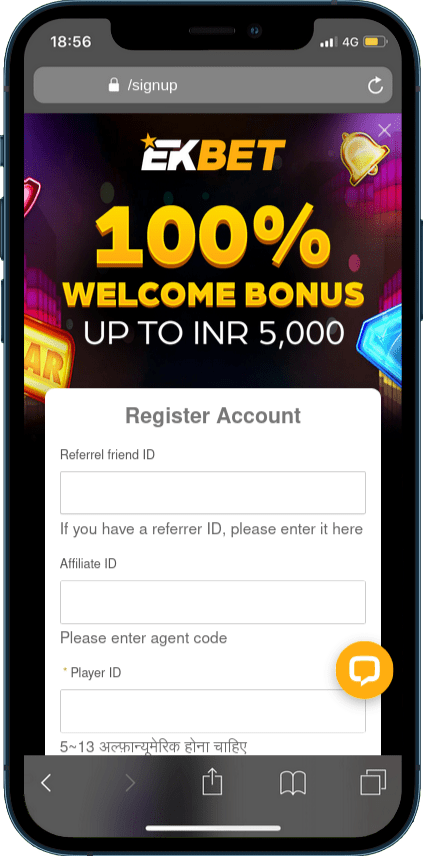
| Field | Required? | What to know |
|---|---|---|
| Referrer friend ID | No | A referring player’s ID. Only accepted at sign-up. |
| Affiliate ID | No | An “agent code”. Only accepted at sign-up; it cannot be added later. |
| Player ID | Yes | Your username. 5–13 letters and numbers, no spaces or symbols. It cannot normally be changed later, so avoid your real name or phone number. |
| Password | Yes | Use a unique password. This account will hold money and identity documents. |
| Mobile number | Yes | Used for verification codes and account recovery. Use a number you will keep. |
| Name and other personal details | At sign-up or before withdrawal | Must match your ID and your payment method exactly — mismatches block withdrawals later. |
Before starting, have ready: a mobile number you control, an email you read, a government photo ID, and a payment method in your own name.
Registration step by step
Open the sign-up form from the operator’s site or app
The “Register” button is at the top of every page. No payment is taken at this stage.
Enter any referral or affiliate code first
These fields are at the top and are optional. They cannot be added after the account exists.
Choose a Player ID
5–13 letters and numbers. If it is rejected as taken, add digits rather than choosing something identifying.
Set a password
Twelve characters or more, used nowhere else. Let a password manager store it.
Enter your mobile number
Choose +91 from the country selector and type the ten digits without repeating the country code.
Confirm the one-time password
See OTP verification below.
Log in and complete your profile
Enter your name exactly as it appears on your ID.
OTP verification
A one-time code is sent by SMS to confirm the number. If it does not arrive, work through these in order:
- Country code entered twice. +91 selected from the list and typed at the start of the number. Re-enter the ten digits only.
- Wait two full minutes. Indian carriers route transactional SMS through a registered-template system and delays are common.
- DND and spam filters. Check your SMS app’s spam or “promotions” folder.
- Request a resend once. Repeated requests can trigger a temporary block on that number.
- Number already registered. Duplicate accounts are not permitted. Use account recovery instead.
If three attempts failContact the operator’s live chat, which can verify the number manually. Do not open a second account with a different number — duplicate accounts are normally closed, sometimes both of them.
KYC requirements
“Know Your Customer” checks confirm your identity and age and that payment methods belong to you. They are usually triggered by your first withdrawal, or earlier for large or unusual transactions.
| Proof of | Accepted examples | Common reason for rejection |
|---|---|---|
| Identity and age | Aadhaar, PAN, passport, driving licence | Cropped corners, glare, expired document |
| Address | Utility bill or bank statement, typically from the last three months | Name or address differs from the account |
| Payment method | Screenshot of the UPI handle, wallet or bank account showing your name | Method belongs to a relative or friend |
Photograph documents flat, in daylight, with all four corners visible. A name written “R. Sharma” on one document and “Rahul Sharma” on another is a frequent cause of rejection — be consistent with the name on the account. When you share Aadhaar, you can use a masked copy that hides the first eight digits.
Verify before you need toSubmitting documents in your first week, while nothing is waiting on them, means your first withdrawal is simply a payment rather than a multi-day review.
Common registration errors
| Message or symptom | Cause | Fix |
|---|---|---|
| Player ID invalid | Under 5 or over 13 characters, or contains symbols/spaces | Letters and numbers only, 5–13 characters |
| Player ID already exists | Taken by another user | Add digits; avoid identifying names |
| Phone number already registered | You (or someone) already has an account with this number | Use Forgot password / Forgot username |
| OTP not received | See the OTP list above | Check the country code, wait, resend once |
| Affiliate/referrer code rejected | Typo or expired code | Leave it blank rather than guessing — it is optional |
| Form resets after submitting | Browser autofill or blocked cookies | Turn off autofill for the form, allow cookies, try again |
What happens after registration
- You can log in on the website or the app immediately with the same details. See the login guide.
- No money is taken until you choose to deposit. See payments.
- Welcome bonuses are normally tied to the first deposit, not to registration. Read the bonus terms guide before you deposit.
- Verification is requested later, typically at the first withdrawal.
How to protect the account
- Use a password that exists nowhere else.
- Never share your password or OTP. No genuine support agent will ask for either.
- Do not store the password on a shared phone and do not let anyone else use the account — that breaches the terms and can void withdrawals.
- Set a deposit limit in the account settings before your first deposit. See setting limits.
Important terms to check before depositing
| Check | Why it matters |
|---|---|
| Minimum and maximum for your payment method | Shown on the deposit form per method; deposits below the minimum can fail or be delayed |
| Whether a bonus applies automatically | A bonused balance is locked until the wagering requirement is met — see bonus terms |
| Withdrawal rules | Withdrawals usually return to a verified method in your own name |
| Responsible gambling tools | Limits are easiest to set before the first deposit |
| The operator’s own terms | They take precedence over anything on this site |